

GenSumo
FREE TOOL

Free Pinterest Font Generator

Transform your text into stylish fonts instantly. Generate eye-catching text in Mathematical Fraktur, Bold, Script, Double-Struck, and many more font styles for your Pinterest pins. Completely free, no sign-up required.

Font Styles

WHY IT MATTERS

Make Your Pinterest Pins Stand Out

Styled fonts help your Pinterest pins catch attention, improve readability, and create visual interest. Transform your text instantly with 20+ Unicode font styles that work across all social media platforms.

Instant Conversion

Transform your text into stylish fonts instantly as you type. No waiting, no processing - see all font styles update in real-time.

20+ Font Styles

Choose from Mathematical Fraktur, Bold, Script, Double-Struck, Monospace, Italic, and many more Unicode font styles.

Universal Compatibility

These Unicode fonts work on Pinterest, Instagram, Twitter, Facebook, TikTok, and most modern platforms that support Unicode.

Easy Copy & Paste

One-click copy for each font style. Simply click the copy button and paste your styled text directly into Pinterest pins.

SEAMLESS INTEGRATION

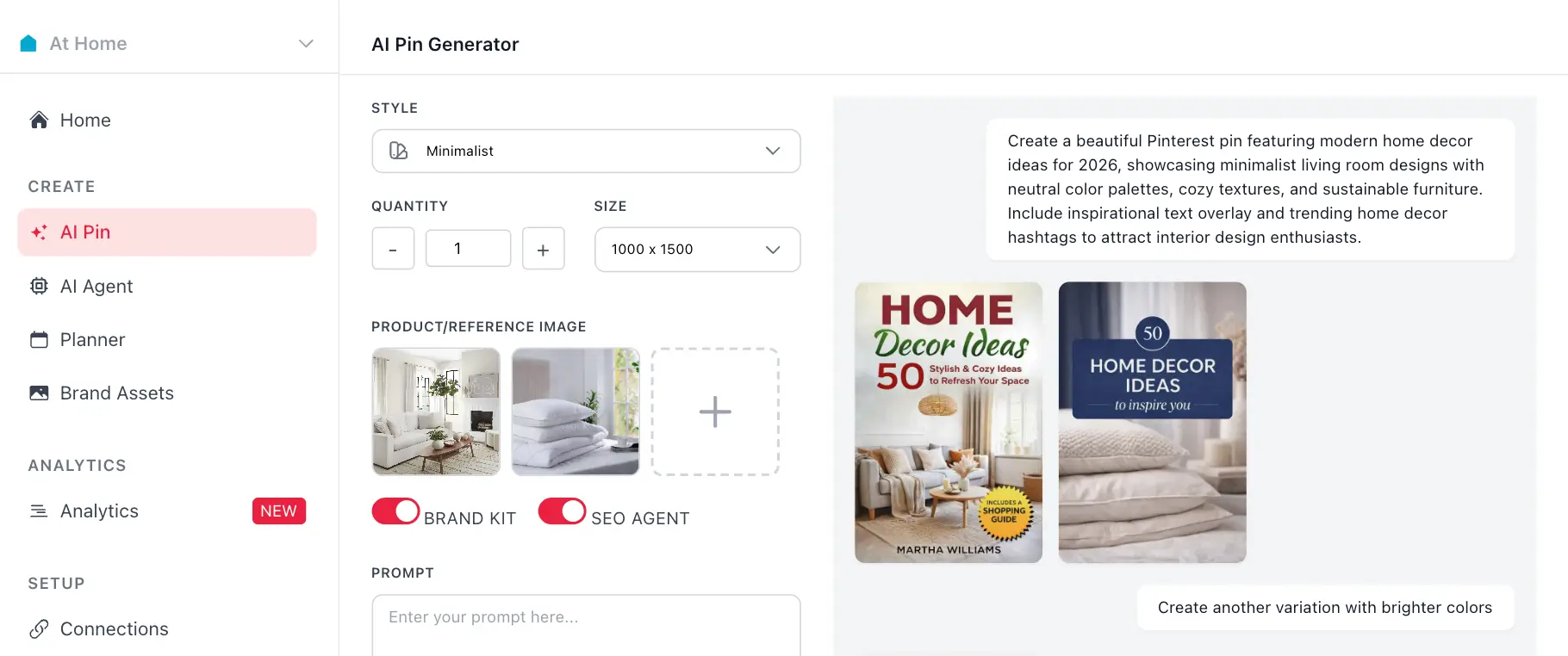
Create Complete Pins with AI Pin Generator

Love this tool? GenSumo's AI Pin Generator creates stunning pins with optimized titles, descriptions, images, and hashtags all at once.


At Home favicon
At Home

AI Pin Generator

Product 1
Product 2

Create a beautiful Pinterest pin featuring modern home decor ideas for 2026, showcasing minimalist living room designs with neutral color palettes, cozy textures, and sustainable furniture. Include inspirational text overlay and trending home decor hashtags to attract interior design enthusiasts.

Generated Pin 1
Generated Pin 2

Create another variation with brighter colors

Generated Pin 3
P
GenSumo
gensumo.com

Brand Colors

Font

Inter
Roboto

Pin Size

Square
1000x1000
Standard
1000x1500
AI-Generated Hashtags Automatically generate relevant hashtags when creating pins with AI
SEO Optimization Get hashtags optimized for Pinterest search and discovery
Multiple Variations Generate multiple pin designs with optimized hashtags for each
Smart Suggestions AI analyzes your content to suggest the best hashtags for maximum reach
SCHEDULING

Schedule Your Pins for Maximum Impact

Once you've created your perfect Pinterest username, schedule your pins to post at optimal times for better reach and engagement.

At Home favicon
At Home

Planner

February 2026

Draft 12 Scheduled 8 Published 24
SUN
MON
TUE
WED
THU
FRI
SAT
1
Pin scheduled for February 1Pin scheduled for February 1
+3
2
Pin scheduled for February 2Pin scheduled for February 2
3
Pin scheduled for February 3Pin scheduled for February 3
+1
4
Pin scheduled for February 4Pin scheduled for February 4
+1
5
Pin scheduled for February 5Pin scheduled for February 5
+4
6
Pin scheduled for February 6Pin scheduled for February 6
7
Pin scheduled for February 7Pin scheduled for February 7
+2
8
Pin scheduled for February 8Pin scheduled for February 8
+5
9
Pin scheduled for February 9Pin scheduled for February 9
+1
10
Pin scheduled for February 10Pin scheduled for February 10
11
Pin scheduled for February 11Pin scheduled for February 11
+3
12
Pin scheduled for February 12Pin scheduled for February 12
13
Pin scheduled for February 13Pin scheduled for February 13
+2
14
Pin scheduled for February 14Pin scheduled for February 14
+4
15
Pin scheduled for February 15Pin scheduled for February 15
16
Pin scheduled for February 16Pin scheduled for February 16
+3
17
Pin scheduled for February 17Pin scheduled for February 17
+1
18
Pin scheduled for February 18Pin scheduled for February 18
+3
19
Pin scheduled for February 19Pin scheduled for February 19
20
Pin scheduled for February 20Pin scheduled for February 20
+4
21
Pin scheduled for February 21Pin scheduled for February 21
+1
22
Pin scheduled for February 22Pin scheduled for February 22
+6
23
Pin scheduled for February 23Pin scheduled for February 23
24
Pin scheduled for February 24Pin scheduled for February 24
+2
25
Pin scheduled for February 25Pin scheduled for February 25
+3
26
Pin scheduled for February 26Pin scheduled for February 26
+2
27
Pin scheduled for February 27Pin scheduled for February 27
+5
28
Pin scheduled for February 28Pin scheduled for February 28
+3
Week of Feb 9
Mon
9
Pin Pin
Tue
10
Pin
Wed
11
Pin Pin Pin
Thu
12
Pin
Fri
13
Pin Pin

Schedule your pins visually in a weekly calendar view

AI Best Times
Monday
9:00 AM
Best
Wednesday
2:00 PM
Best
Thursday
5:00 PM
Optimal
Friday
11:00 AM
Best

Get AI-powered suggestions for the best posting times

Spread Content
9:00 AM
Pin
โ†’
2:00 PM
Pin
โ†’
6:00 PM
Pin
Every 5 hours

Automatically spread pins with customizable time intervals

FAQ

Frequently asked questions

Your most important questions about our free Pinterest hashtag generator answered here.
Simply type your text into the input field, and our tool instantly converts it into various Unicode font styles. The generator uses Unicode characters to transform your text into different font styles like Mathematical Fraktur, Bold, Script, Double-Struck, and many more. The conversion happens in real-time as you type.
Our generator supports 20+ font styles including Mathematical Fraktur, Bold, Script, Double-Struck, Monospace, Italic, Bold Italic, Sans-Serif (and its variants), Circled, Parenthesized, Small Caps, Inverted, Reversed, Fullwidth, Squared, Negative Squared, and more. Each style transforms your text using Unicode characters.
Yes! These Unicode fonts work on Pinterest and most social media platforms. Simply copy the styled text and paste it into your Pinterest pin titles, descriptions, or anywhere else you want to add visual interest. However, note that some platforms may not support all Unicode characters.
Each font style has its own 'Copy' button. Click the button next to any font style to copy that styled text to your clipboard. You can then paste it directly into Pinterest or any other platform.
Yes! Most font styles support numbers, and some support common special characters like spaces, punctuation marks, and symbols. The generator preserves spaces and converts characters that have Unicode equivalents in each font style.
Yes, you can use these Unicode fonts in Pinterest pin titles, descriptions, and board names. They add visual interest and help your pins stand out. However, use them sparingly and ensure your text remains readable.
The generator works with any text length, but very long texts may take a moment to convert. Some font styles may not have Unicode equivalents for all characters, in which case those characters will remain unchanged. The tool works best with standard letters, numbers, and common punctuation.
No account is required! Our Pinterest font generator is completely free and accessible without any registration. Simply visit the page, type your text, and start copying styled fonts.
Yes, completely free! There's no sign-up required, no credit card needed, and no hidden fees. Generate as many font variations as you need without any limitations.
Yes! These Unicode fonts work on most platforms that support Unicode characters, including Instagram, Twitter, Facebook, TikTok, and more. However, platform support may vary, so test your styled text before publishing.
Unicode font conversion uses special Unicode characters that look like styled letters. These characters are part of the Unicode standard and are recognized by most modern platforms. They're not actual fonts but special characters that appear styled.
Some Unicode font styles don't have equivalents for all characters. When a character doesn't have a Unicode equivalent in a particular style, it remains in its original form. This is normal and expected behavior.
While you can manually combine text from different font styles, each font style is designed to be used independently. For best results, choose one font style per pin or text element to maintain consistency and readability.
Use styled fonts strategically in your pin titles to catch attention. Combine styled text with high-quality images and clear calls-to-action. Don't overuse fonts - sometimes less is more. Test different styles to see what resonates with your audience.
Absolutely! While this is a free standalone tool, GenSumo users can create styled text here and then use it in their Pinterest pins scheduled through GenSumo. GenSumo offers comprehensive Pinterest management tools including pin scheduling, analytics, and more.